CORBOBO Keyboards Manufacturer
Top CORBOBO Keyboards
CORBOBO x LEOBOG Hi75
CORBOBO x AULA F98X
CORBOBO Ki75 Wireless DIY Kit
Elevate your desk setup with a fusion of high-end aesthetics and budget-friendly performance that redefines the modern typing experience.

Product Categories
Mechanical Gaming Keyboards
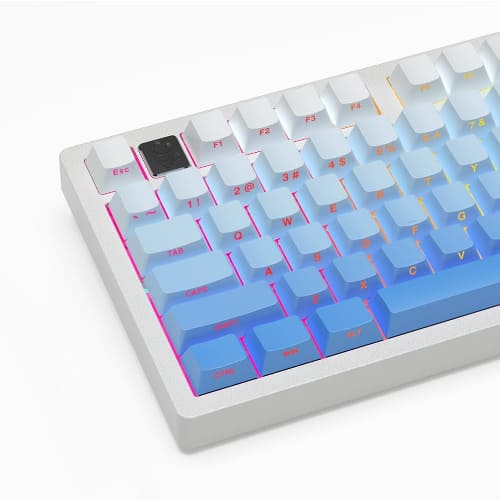
These compact 60%, 65%, and 75% powerhouses feature gasket mounts and hot-swappable switches designed to deliver that coveted “creamy” sound and ultra-responsive feedback for competitive gaming.
Professional Office & Multimedia Boards
Designed with sleek aluminum frames and integrated volume knobs, these versatile units provide a sophisticated look and tactile efficiency for seamless transitions between heavy data entry and media control.
User Experiences
Marcus Thorne: After swapping my old plastic deck for the CORBOBO 75% aluminum model, the difference in build quality was immediately apparent; the gasket mount provides a cushioned, flexible typing feel that has completely eliminated my finger fatigue during ten-hour coding sessions. The “creamy” sound profile is no marketing gimmick—it’s deep, thocky, and lacks any of the hollow pinging found in other budget boards, making it the most satisfying peripheral I’ve owned for under $100.
Elena Rodriguez: As a freelance graphic designer who constantly switches between my MacBook and gaming PC, the tri-mode wireless connectivity on my CORBOBO 65% has been a total game-changer for my cable management. I was skeptical about the “mechanical-feel” membrane options at first, but the tactile response is surprisingly crisp, and the vibrant RGB backlighting actually helps me navigate shortcuts in low-light studio conditions.
Julian Vane: I purchased one of the barebones DIY kits to finally try my hand at custom building, and the hot-swappable PCB made it incredibly easy to snap in my preferred linear switches without touching a soldering iron once. The board’s weight is substantial enough to stay planted on my desk during intense gaming matches, and the pre-installed dampening foam gives the acoustics a premium, high-end finish that rivals keyboards twice its price.
CORBOBO FAQ
Are CORBOBO keyboards compatible with both Windows and Mac?
Yes, most CORBOBO models are designed with universal compatibility and include a physical toggle switch or a function-key shortcut to swap between Windows and macOS layouts. This ensures that system-specific keys, like Command or Alt, function correctly regardless of your hardware.
How do I connect my keyboard using the tri-mode wireless feature?
To connect, simply use the toggle switch on the back or side of the keyboard to select 2.4G (for the USB dongle), BT (for Bluetooth), or Wired mode. For Bluetooth pairing, hold FN + Q, W, or E for three seconds until the indicator flashes, then select the keyboard from your device’s Bluetooth settings.
What kind of switches can I use with the hot-swappable sockets?
Our hot-swappable PCBs are highly versatile and typically support both 3-pin and 5-pin MX-style mechanical switches (such as Cherry, Gateron, Kailh, or LEOBOG). This allows you to customize your typing feel by simply pulling out the old switches and snapping in new ones without any soldering required.
Where can I download the driver software for my keyboard?
You can find the official customization drivers for remapping keys, setting macros, and adjusting RGB lighting at bit.ly/m/corbobo. Please note that most CORBOBO software is currently developed for Windows systems and usually requires a wired USB connection to sync your settings.
How long does the battery last on wireless models?
Wireless models like the Ki75 and K98 are equipped with high-capacity batteries (ranging from 4000mAh to 10000mAh) that provide roughly 25 to 60 hours of use with RGB lighting turned on. If you turn the backlighting off, the battery life can extend significantly, lasting for several weeks of standard office use.
Can I change the RGB lighting effects without using software?
Absolutely, you can cycle through built-in lighting modes using the FN + \ (backslash) or FN + Insert keys, depending on your specific model. Many of our keyboards also feature a multi-function knob that allows you to adjust brightness or change lighting effects by pressing and rotating it.
What is a “gasket mount” and why is it better?
A gasket mount means the keyboard plate is held in place by flexible rubber or foam gaskets rather than being screwed directly into the frame. This creates a softer, more cushioned typing feel and helps dampen internal vibrations, resulting in the “creamy” or “thocky” sound that mechanical keyboard enthusiasts love.
